
How interactive email works
 by Chad Zollinger Founding Marketer
Published
How interactive email works
Interactive email lets customers take actions inside the inbox with no redirect. This article covers how it renders, who sees it, and how to measure what it does.


TL;DR
Here's a slide deck we prepped so you don't have to read an entire wall of text. If you like reading walls, just skip the slides.
Shoppable & interactive emails that convert
Book a demoAlmost every digital surface you interact with has been rebuilt in the last decade. You can generally change a flight, cancel a gym membership, or sign a mortgage document without leaving the screen you started on. Email hadn’t gotten that treatment and, to a degree, is still disregarded by the tech giants. The email you sent this morning behaves the way email behaved in 2010: someone reads it, and if you want them to do anything about it, they have to leave.
At least, that’s how it was before Zaymo…
We’re making emails act differently (to the particular benefit of eComm stores that offer subscriptions). Instead of “click through and then we’ll show you your options,” the email says “here are the options, pick the best and be on your way.” A subscriber pushes their next shipment back two weeks without opening a browser. A customer adds a product to an upcoming order straight from the billing reminder. Emails go from being an announcement channel to a conversion driver.
As a Zaymo customer recently told me, “our billing reminders were a cost center. Now they’re a revenue center.”
That raises fair questions though, and this article addresses them in order:
- what in-email interactivity is at a technical level,
- which of your subscribers will see it,
- what happens to the ones who don’t, and
- why your current reporting will likely be off.
What in-email interactivity actually is
When someone sees an interactive email for the first time, they usually think the same thing: ya right, that’s just a GIF.
It’s a fair thing to assume, because most of what gets sold as interactive email really is just a GIF. The ecom industry has spent years calling animation “interactivity,” and the two couldn’t be further apart, mainly because of one vital functionality difference.
Decoration versus action
The question that matters isn’t whether something on the screen moves; it’s whether the click does anything on the back end.
A countdown timer counting down, a hover state, and an animated product shot are all a decoration. None of them change anything when the customer interacts with them, because there’s nothing behind them to change. Delaying a shipment, swapping a subscription plan, adding a product to the next order, or submitting a review is an action. Their order needs to actually be delayed, which means data needs to be passed and updated on the backend. Something in your system is different afterward: the state has changed.
This piece is about the action behind the interaction.
What makes action possible
There are three technologies that make it work.
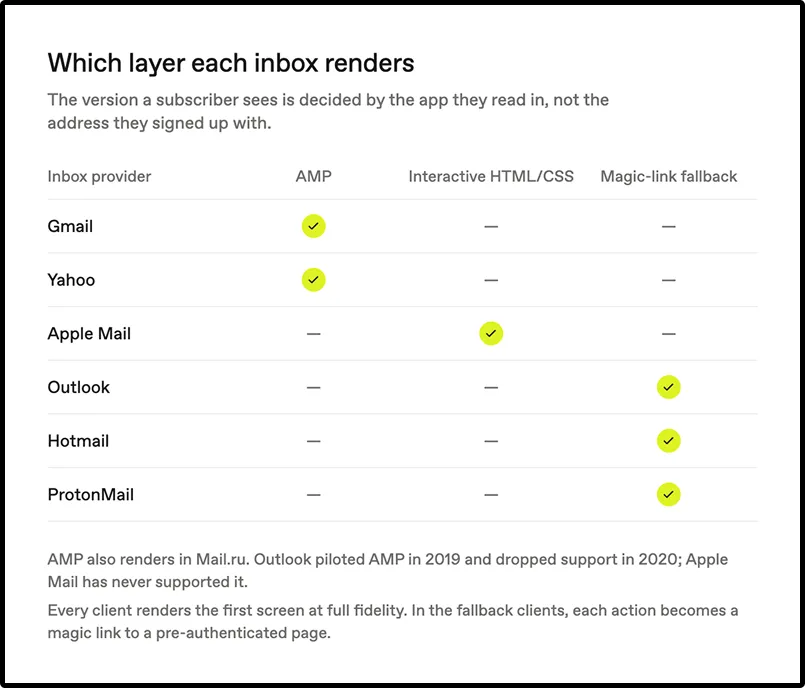
AMP for email is a Google framework that lets an email talk to a server and update itself in place, no redirect required. Components like amp-form handle submissions and amp-list pulls live data at open time, so the email can show current inventory or a current subscription rather than whatever was true when you hit send. AMP renders in Gmail, Yahoo Mail, and Mail.ru. Outlook piloted it in 2019 and dropped support in 2020. Apple Mail has never supported it.
Interactive HTML and CSS is the technique that reaches the clients that AMP can’t. Zaymo uses interactive HTML and CSS to let supported Apple Mail users take actions and see updated content inside the email. This is how interactivity reaches Apple Mail, which is the single largest client in most US consumer brands’ audiences.
Classic HTML and CSS is the plain email everyone can render. It’s the floor, and it’s where your fallback lives. More on that in a moment, because the fallback is the part most vendors quietly skip.
Which inbox someone uses decides what they see
Inbox provider, not email domain
If your list is full of gmail.com addresses, that tells you less than you think. The app a subscriber actually reads in is a major factor in which version they see. Their email address alone does not establish whether interactivity will work.
A large share of people with a Gmail address read that mail inside Apple Mail on an iPhone, which means Gmail’s AMP support is irrelevant to them. The domain in your database and the client doing the rendering are two different facts.
Interactivity also depends on platform support, settings, sender approval where required, and message validity.
Device doesn’t decide it either
Mobile versus desktop alone doesn’t tell you whether interactivity will render.
Supported Gmail apps can display AMP when the necessary requirements are met. Supported Apple Mail clients can display interactive HTML/CSS, while Outlook receives the fallback.
A high mobile-open share by itself does not establish your audience’s interactive coverage.
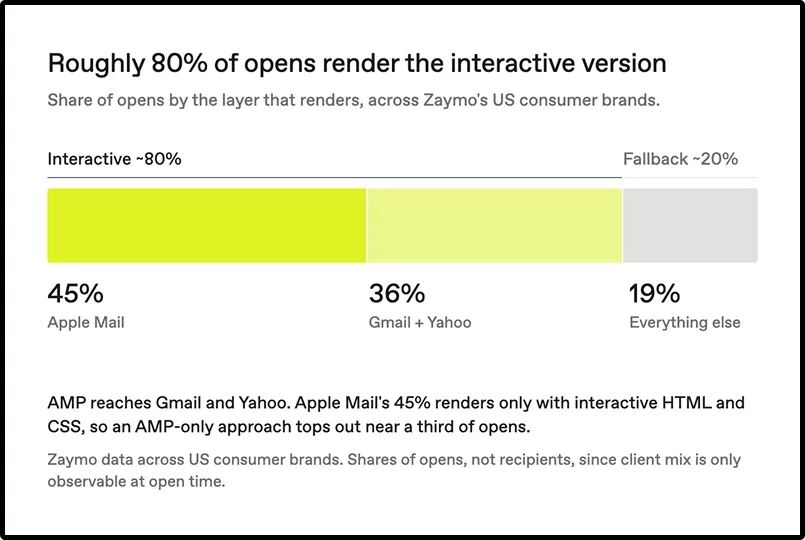
How much of your list actually sees the interactive version
Here’s the honest math, based on Zaymo’s data across US consumer brands.
Zaymo estimates roughly 81% interactive coverage for the average US consumer brand. The remaining 19% or so get the fallback. Actual coverage varies by audience and configuration. Inside that interactive share though, Apple Mail accounts for about 45% and Gmail plus Yahoo account for about 36%. Outlook, Hotmail, and everything else make up the rest.
That breakdown is the whole strategic point of this article, so it’s worth sitting with. If your interactivity runs on AMP alone, you are building for the 36%. Apple Mail’s 45%, the largest single slice of your audience, sees a static email no matter how good the AMP is. Reaching that group requires a second technique, and a vendor either built one or didn’t.
This isn’t a claim about any competitor. It’s arithmetic. AMP renders in Gmail and Yahoo. Apple Mail is not Gmail or Yahoo. An AMP-only approach tops out near a third of your opens, and no amount of design work moves that number.
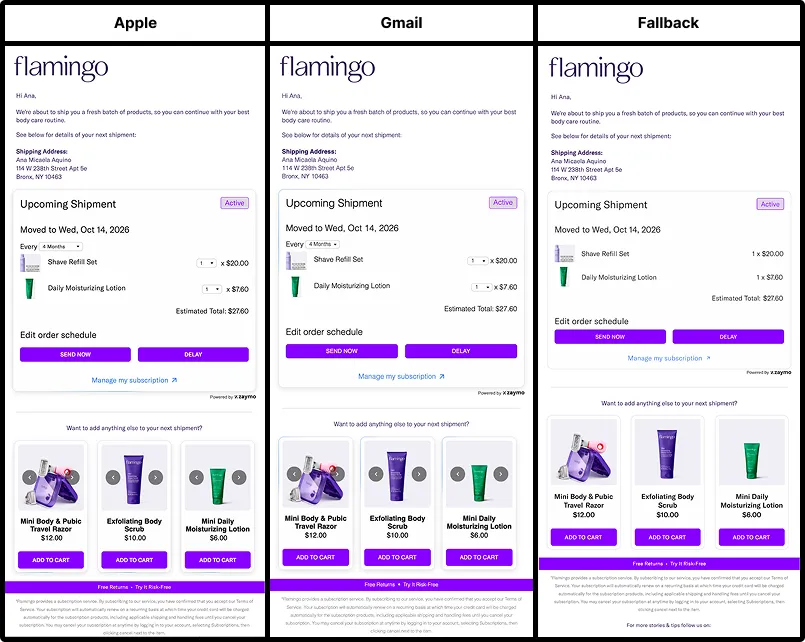
What happens in the inboxes that can’t go interactive
How the fallback works
In clients that support neither AMP nor interactive HTML/CSS, the recipient generally sees a high-visual-fidelity fallback of the block’s initial state, with behavior varying by block. It kinda looks like the real thing, because it is the real thing, just not quite interactive yet.
Almost every action in that block becomes a magic link. The customer clicks, lands on a pre-authenticated page, and confirms. Supported actions use a pre-authenticated experience, avoiding a separate account login. Recipients without a card on file may be directed to a pre-filled checkout to provide payment details. The page uses a two-click confirm rather than an undo, so the customer approves the change before it happens instead of reversing it after; but the action still gets completed.
What the fallback can’t do
Product grids render as static grids with individual product links, rather than supporting in-email product selection. In-email dropdowns and checkboxes aren’t available, so anything that depends on choosing before submitting moves to the landing page. Landing-page customization is limited, so the fallback experience may differ visually from the email. And because of the two-click confirm, there’s no undo once the customer lands there.
A few blocks don’t translate to a confirmation page at all. Image carousels become an auto-advancing GIF. Open animations don’t play. And custom action buttons, the ones wired to your own endpoints, send the customer to a hosted copy of the email instead of a confirmation page, where they tap the button a second time before anything happens.
None of that stops the action. It does mean the experience for that 20% is good rather than seamless, and you should plan your copy accordingly.
Why your email metrics don’t show what interactive email does
Opens, clicks, and click-to-open were designed for a world where the valuable thing happened after someone left. The click was a proxy for intent because the click was the handoff. Every dashboard you use was built on that assumption.
Interactive email breaks the proxy. When the subscriber delays a shipment inside the message, there’s no click out to a site, so a click-only report sees nothing.
The email that did the most work in your program can look like the one that did the least. A test can show flat click rates even when subscribers complete actions inside the email. Click-only reporting can miss those actions. Track completed in-email actions alongside business outcomes, and compare results against a control. If you report an action rate, define its numerator and denominator… for example, unique recipients who completed an action divided by unique measured openers. Measured opens are not necessarily human opens, and an action rate alone does not demonstrate incremental lift.
Zaymo tracks in-email actions, and supported events can be used in connected tools such as Klaviyo, depending on the integration and configuration. Review action events alongside your existing reporting rather than relying on click counts alone.
Attribution settings affect how Klaviyo credits outcomes to an email; they do not determine whether Zaymo records an action. For in-email actions without a tracked click, excluding open-based attribution or Apple Mail Privacy Protection opens can prevent Klaviyo from attributing related third-party events to the message. Zaymo-specific events can still be attributed in Zaymo analytics. Use consistent attribution settings when comparing test and control, and distinguish recorded actions from attributed downstream outcomes.
Including MPP opens has a cost too. Apple’s automated opens can restart attribution windows and credit the email with conversions it didn’t cause, and the longer the window, the worse it gets. Compare test and control on a short window first, and treat long-window numbers with suspicion.
What it takes to send interactive email
Four things gate it, and none of them is a development project.
Sender authentication. Configure SPF, DKIM, and DMARC correctly and meet Gmail’s authentication requirements for AMP messages. These AMP requirements should not be confused with the separate requirements for Apple Mail interactivity. If your deliverability is already in decent shape, this is usually done.
AMP approval. Sending AMP requires registering with Google, and registration works per sender address, not per domain. hello@yourbrand.com and support@yourbrand.com each need their own approval, so switching the address you send from means applying again. Zaymo applies on your behalf and advises allowing 10 to 14 days for the approval process. This is an onboarding estimate, not a guaranteed Google turnaround. Approval depends on continued compliance with Google’s requirements and can be revoked. While you wait, Gmail treats your email like any non-interactive client.
A branded sending domain. AMP applications get rejected without one, so you need to be sending from your own authenticated domain rather than your ESP’s shared one. Most established programs already are.
Email size. The AMP HTML portion must not exceed 200,000 bytes. This limit applies to the AMP portion, not the total email size. Past that, it quietly shows the fallback instead, and ESPs sometimes add enough code on send to tip a template over the line. Zaymo warns you in the builder, but it’s the first thing to check if a Gmail test comes back non-interactive.
Worth noting: Apple Mail interactivity runs on HTML and CSS, so it doesn’t depend on AMP approval at all. That means the largest portion of your audience is interactive from day one, while the AMP registration works through the queue in the background. You’re not waiting to start.
How Zaymo does interactive email
Coverage is the first difference, and it follows directly from the math above. Zaymo runs AMP for Gmail and Yahoo, interactive HTML/CSS for Apple Mail, and a magic-link fallback for everyone else. That layering is why roughly 81% of recipients get an interactive experience, instead of only the Gmail and Yahoo share an AMP-only approach can reach.
The second difference is what the action touches. Supported in-email actions update the connected subscription or commerce platform. Available actions and event syncing depend on the integration and configuration. It isn’t a landing page that happens to be embedded in an email. The subscription genuinely changed.
The third is reuse. Subscription editing, cross-sell, swap-up, reactivation, review collection, and forms all run on the same interactive layer, so you’re not commissioning a custom build every time a campaign needs to do something. And because in-email actions are tracked natively, the lift shows up in reporting rather than disappearing into the measurement gap described above.
See what your upcoming order email could do instead.